Smart App Control (SAC) is a security feature in newer updates of Windows 11 that blocks applications it cannot verify as safe, even if they are digitally signed. It’s stricter than older SmartScreen checks and behaves differently depending on how the system was set up.
When Windows says:
- “Smart App Control won’t allow this app”
- “This app is not trusted”
…it means Windows does not recognize your app’s signature as coming from a publisher it trusts, or the app’s behavior/metadata doesn’t meet SAC’s criteria.
Course Designer 4 is a digitally signed’application. This means that you can trust that the application has not been altered or tampered with. However under the new stricter rules, even if the app is signed, SAC only trusts:
- Microsoft Store apps
- Apps signed with an EV (Extended Validation) certificate
- Apps with a reputation in Microsoft’s cloud reputation system
A small developer certificate (like the one Course Designer has used for years) may not pass depending on how securely your Windows 11 has been configured. This can be true if you have downloaded it directly from the web using the Edge browser or from a cloud drive where you have kept a copy of the installer.
To proceed, you need to tell Windows 11 that you trust the application. You can do this as follows:
Steps:
- Right‑click the installer or EXE (i.e. cd434en.exe)
- Select Properties
- On the General tab, look at the bottom for:
- “This file came from another computer and might be blocked to help protect this computer.”
- A checkbox labeled Unblock
- Check Unblock
- Click Apply, then OK
- Run the installer again
If you are unsure whether you can trust the installer executable, you can view its security certificate yourself. To do this, right‑click the installer (e.g., cd434en.exe), select Properties, and then open the Digital Signatures tab. A secure copy of the installer will show the correct publisher information and should look like this:
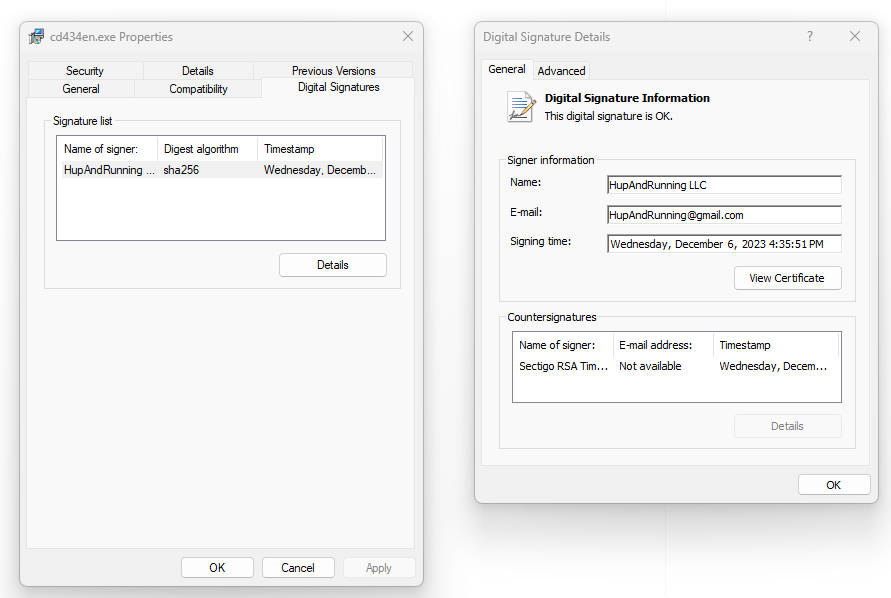
The only correct, secure publisher of Course Designer 4 is “HupAndRunning LLC”
 Course Designer 4